Customer Relationship Management (CRM) is the backbone of any successful marketing and sales workflow. For WordPress users, integrating a quality CRM plugin can make the difference between chaotic customer management and structured, streamlined communication. Whether it's capturing leads, nurturing them with targeted content, or closing sales through seamless follow-up, CRM plugins for WordPress can help bridge the gap between your website visitors and paying customers.
This article compares popular WordPress CRM plugins based on how well they help site owners capture leads, nurture relationships, and close sales. Let's dive into the capabilities of each plugin and examine which solution may be ideal for your business goals.
While you trial CRMs and webhooks, add WP Email Log so every outgoing message (form captures, confirmation emails, follow-ups) is recorded—making it easy to verify automations, spot deliverability gaps, and re-send tests before scaling campaigns.
Top WordPress CRM Plugins Compared
1. HubSpot for WordPress
HubSpot CRM offers a robust and free WordPress plugin that integrates site engagement with marketing automation. HubSpot’s strength lies in its all-in-one platform with built-in forms, live chat, and email automation tools.
- Capture: Built-in forms, pop-ups, and live chat allow effortless lead capture.
- Nurture: Automated email marketing sequences keep contacts engaged over time.
- Close: Deal tracking and pipeline management made accessible from your WP dashboard.

Pros:
- Deep marketing automation capabilities
- Highly visual drag-and-drop email editor
- Free tier suitable for small businesses
Cons:
- Upgrades can become costly as the business scales
- Some advanced features require use of the HubSpot portal, not entirely inside WordPress
2. FluentCRM
FluentCRM is a fully self-hosted WordPress CRM that delivers impressive performance without depending on third-party services. It’s built specifically for WordPress users who want to control their data and marketing funnel within their own platform.
- Capture: Integrates with popular form plugins like WPForms and Gravity Forms.
- Nurture: Smart lists and email sequences for tailored communication workflows.
- Close: Campaign and customer activity tracking make it easier to identify warm leads ready to convert.
Pros:
- Data remains on-site, enhancing privacy and speed
- One-time pricing available
- Powerful email capabilities built-in
Cons:
- Does not include a built-in chat feature
- No mobile app support at this time
3. Jetpack CRM
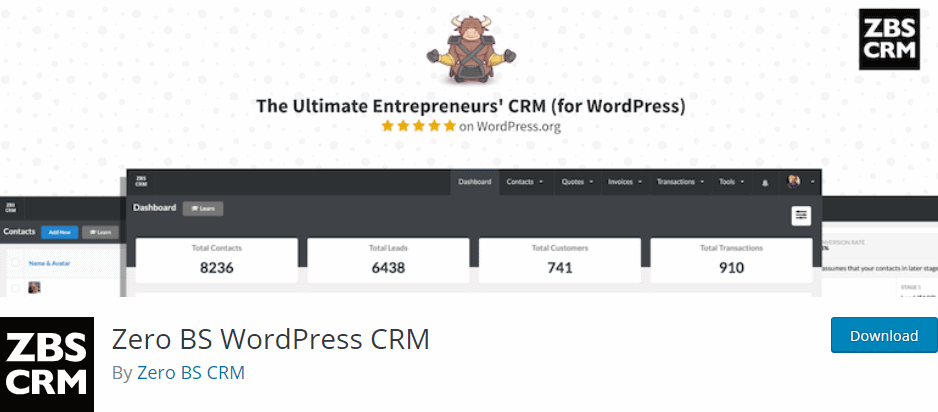
Originally known as Zero BS CRM, Jetpack CRM is built by Automattic, the creators of WordPress.com. It offers a straightforward CRM experience designed to help small businesses manage customer data, transactions, and communications.
- Capture: Use Jetpack CRM forms or integrate with third-party contact plugins.
- Nurture: Send emails directly from the plugin and tag customers based on behavior or purchase history.
- Close: Sales tracking and invoicing features simplify the close stage.
Pros:
- One of the most intuitive CRMs available
- Optional modules let you customize what you need
- Built by a trusted WP team
Cons:
- Some features require paid extensions
- Fewer marketing automation options compared to HubSpot or FluentCRM
4. WP ERP
WP ERP is more than a CRM plugin—it's a full-fledged enterprise resource planning tool. It includes several modules: HR, CRM, and Accounting. While it’s more complex than other options, it's ideal for businesses needing all-in-one infrastructure.
- Capture: Integrates with contact forms and user registrations.
- Nurture: Manage core contact details and automate various touchpoints.
- Close: CRM notes and scheduling help streamline long-term business relationships.
Pros:
- Perfect for businesses needing a multi-role system
- Includes a contact lifecycle tracker
- Free core plugin with modular upgrades
Cons:
- Learning curve for non-enterprise users
- User interface could use modernizing
5. Groundhogg
A plugin that provides both CRM and marketing automation, Groundhogg is targeted at small to medium-sized businesses seeking control without subscriptions. It integrates deeply with core WordPress functionality and is designed for marketers who want automation without external platforms.
- Capture: Add contacts through custom forms or integrations with ecommerce plugins like WooCommerce.
- Nurture: Visual funnel builder, scheduling, and drip campaigns.
- Close: Pipeline and lead scoring integrations enable organized sales processes.
Pros:
- Affordable one-time pricing
- Rich suite of marketing tools
- Great for agencies and marketers
Cons:
- UI may feel overwhelming for new users
- Lacks the polish of bigger CRMs like HubSpot
Choosing the Right CRM for Your Needs
The best CRM plugin depends on your preferences, technical ability, and goals. Here’s a quick comparison based on each CRM's strengths across key stages:
| CRM Plugin | Best at Capturing | Best at Nurturing | Best at Closing |
|---|---|---|---|
| HubSpot | ★★★★★ | ★★★★★ | ★★★★☆ |
| FluentCRM | ★★★★☆ | ★★★★★ | ★★★★☆ |
| Jetpack CRM | ★★★☆☆ | ★★★☆☆ | ★★★★☆ |
| WP ERP | ★★★☆☆ | ★★★☆☆ | ★★★★☆ |
| Groundhogg | ★★★★☆ | ★★★★★ | ★★★★☆ |
Final Thoughts
Choosing the right WordPress CRM plugin involves balancing ease of use, data ownership, customization, and marketing automation. Businesses aiming for quick, scalable integration might lean toward HubSpot. Those focusing on hosted data and deep WordPress integration often choose FluentCRM or Groundhogg. Meanwhile, Jetpack CRM and WP ERP appeal to those wanting more invoicing or ERP features alongside customer relationship tools.
As your contact list grows and your business expands, having the right tool to capture, nurture, and close your prospects becomes essential for sustained success.
Frequently Asked Questions (FAQs)
- What is a CRM plugin for WordPress?
- A CRM plugin helps you manage customer interactions, lead management, and marketing automation directly from your WordPress site.
- Can I use a CRM plugin without coding skills?
- Yes. Most WordPress CRM plugins offer user-friendly dashboards, drag-and-drop builders, and pre-built workflows that require no coding.
- Which CRM