Getting blocked by Aion 2 error code 40309 can feel confusing, especially when the game was working fine before. You try to log in, wait a moment, and then access gets denied. This error matters because it stops you before character selection and makes the game unusable. Sometimes it shows up after a network change, and sometimes it appears without any warning.
This guide explains what the error means, why it happens, how to fix it safely, and how to avoid it later.
What Is Aion 2 Error Code 40309?
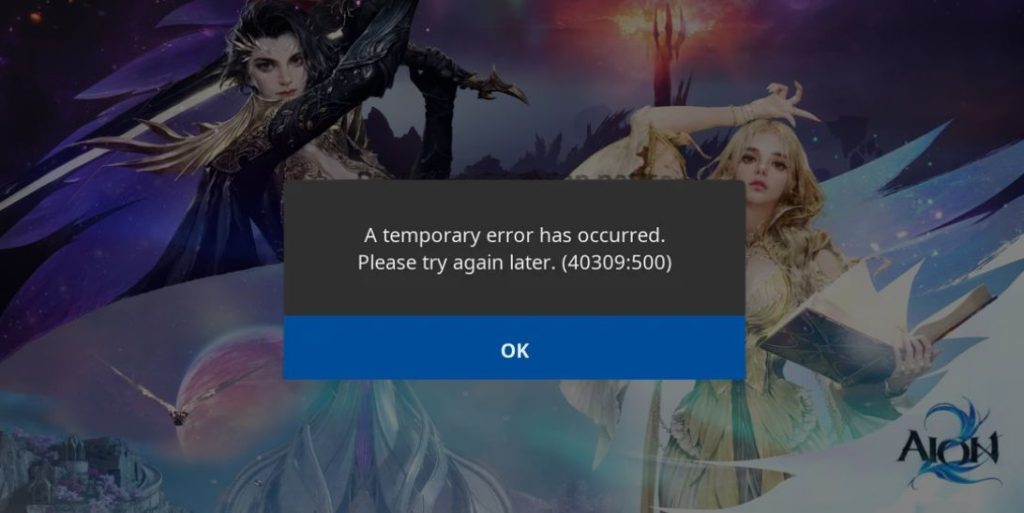 Aion 2 error code 40309 is an access-related error that appears when the game server refuses a login request. It usually means the server did not approve the connection based on account, region, or network checks. This error does not point to a crash, corrupted files, or graphics issues. Instead, it relates to authorization and permission rules handled by the login or game servers during the connection process.
Players usually see error code 40309 during login or while connecting to a server. It often appears in the launcher or right after entering account credentials. In most cases, the error blocks progress before the character selection screen loads.
Common Causes of Aion 2 Error Code 40309
This error can happen for several reasons, and most of them depend on how your account and network connect to the game servers. Some causes are temporary, while others relate to access rules. Below are the most common reasons players encounter this issue.
- Temporary server maintenance or downtime
- Account authentication failure
- IP address flagged or blocked by servers
- Region restriction applied to Aion 2
- VPN or proxy service interference
- Launcher cache or expired login token
- Firewall blocking outbound game traffic
How to Fix Aion 2 Error Code 40309?
In most cases, error code 40309 clears once the correct access conditions are restored. However, the right fix depends on whether the issue comes from the server, your account, or your network. The fixes below move from simple checks to direct solutions. Try them in order and stop once the error disappears.
Fix #1: Check Aion 2 Server Status
Sometimes error code 40309 appears because the game servers are not accepting logins. This often happens during maintenance, updates, or short outages. When servers are restricted, the launcher blocks access automatically, even if your account and internet are fine. Checking the server status first helps you avoid wasting time on fixes that will not work.
Follow the steps below to easily check the Aion 2 server status:
- Open your web browser
- Visit the official NCSOFT website
- Open the Aion 2 news or announcements section
- Check for maintenance or downtime notices
- Look at the posted time and affected regions
- Compare it with your current time zone
- Wait until servers are fully back online before logging in
Fix #2: Restart the Game Launcher
Launcher sessions can expire or become unstable after long idle times. When this happens, authentication tokens fail and trigger error code 40309. Closing and reopening the launcher refreshes the login session. This allows the launcher to request new access credentials from the server. After restarting, log in again and try connecting.
Fix #3: Disable VPN or Proxy Services
VPNs and proxy services often cause access errors because game servers block shared or masked IP addresses. Aion 2 may reject the connection if it detects traffic coming from a VPN network. This leads to error code 40309 during login. Turning off the VPN allows the server to see your real IP address, which usually restores access.
Here’s how you can disable VPN or proxy services in just a few seconds:
- Close Aion 2 and the game launcher
- Open your VPN or proxy application
- Click Disconnect or Turn Off
- Make sure the VPN icon disappears from the system tray
- If using a browser proxy, disable it from network settings
- Restart your internet connection
- Launch Aion 2 again without the VPN active
Fix #4: Restart Your Network Connection
Network issues can cause temporary IP conflicts or routing problems. Restarting your router or modem assigns a fresh IP address and clears cached routes. This helps if your previous IP was flagged or unstable. After restarting the network, wait a few minutes before launching the game again.
Fix #5: Check Account Login Credentials
Incorrect or outdated login details can also cause access denial. Sometimes the launcher stores old session data that no longer matches the account. Logging out fully and signing in again helps refresh account authentication. Make sure the correct account is used, especially if multiple accounts exist on the same system.
Fix #6: Change DNS Settings
DNS issues can prevent your system from reaching Aion 2 login servers correctly. When DNS fails to resolve server addresses, the connection request may be rejected, causing error code 40309. Switching to a stable DNS setup helps your system communicate properly with authentication servers.
The following steps will show you how to change DNS settings properly:
- Open Control Panel on your system
- Go to Network and Internet
- Click Network and Sharing Center
- Select Change adapter settings
- Right-click your active network connection
- Click Properties
- Open Internet Protocol Version 4 (IPv4)
- Set DNS to automatic or enter a trusted DNS
- Save changes and restart your network
Fix #7: Allow Aion 2 Through Firewall
Firewalls sometimes block game traffic without showing clear warnings. If Aion 2 or its launcher does not have permission, login requests may never reach the server. This causes error code 40309 even though your internet works. Allowing the game through the firewall restores proper communication.
Perform the following steps carefully to allow Aion 2 through the firewall:
- Open Windows Security
- Click Firewall and network protection
- Select Allow an app through firewall
- Click Change settings
- Find Aion 2 and its launcher in the list
- Check both Private and Public boxes
- If missing, manually add the game executable
- Save changes and restart the launcher
Fix #8: Contact NCSOFT Support
If none of the fixes work, the issue may relate to account-level restrictions or server-side rules. In such cases, only official support can check the account status. Contacting NCSOFT support allows them to review logs and access permissions tied to your account.
When reaching out, provide your account ID, region, error code, and the time the error appears. This helps support teams diagnose the issue faster.
Prevention Tips to Avoid Aion 2 Error Code 40309 in the Future
Preventing access errors saves time and avoids repeated login failures. A few simple habits reduce the chances of seeing this error again.
- Avoid using VPNs while playing
- Keep the game launcher updated
- Use a stable internet connection
- Monitor official server announcements
- Log out properly after each session
- Avoid repeated failed login attempts
- Keep firewall rules clean and updated
Conclusion
In short, Aion 2 error code 40309 is an access-related issue tied to server permissions, account authentication, or network conditions. It usually appears during login and blocks access before gameplay begins. Most causes involve VPN use, IP restrictions, or temporary server rules.
Try the fixes calmly and give each one time to work. If the error continues, contacting NCSOFT support is the safest step. If this article helped you, share it with other players and leave a comment explaining which fix worked for you.