Pollo.ai has rapidly emerged as a top-tier AI video generator platform, offering a broad suite of tools—from text prompts to image to video AI transformations. Among its most notable features is the AI Face Swap tool, designed for anyone wanting to seamlessly swap faces in video in a free, online, and user-friendly environment. This review investigates how well Pollo.ai executes as an AI video maker, focusing on its face swap capabilities, strengths, and potential challenges.
What Is the Pollo.ai AI Face Swap Video Generator?
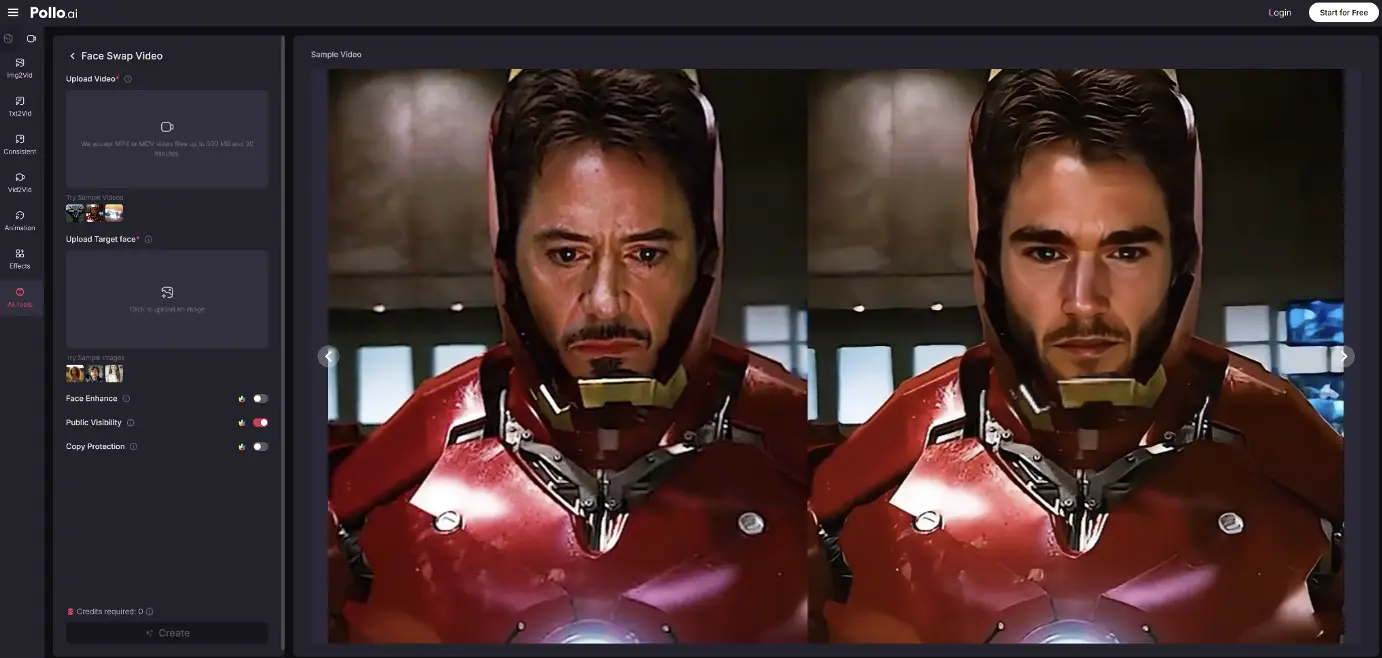

The AI Face Swap tool allows users to replace faces in nearly any video—whether GIFs, anime clips, or real-life footage—by uploading a target video and a face image. Pollo.ai then automatically processes each frame, blending the new face with consistent lighting, expression, and shadow. The tool is part of a larger ecosystem offering image to video AI, AI video creator functionality, and more.
How the Pollo.ai AI Video Maker Works
1. Workflow and Interface
- Navigate to the Face Swap Video tool on Pollo.ai.
- Upload your video (MP4, MOV, GIF) up to 500 MB and 30 minutes long.
- Upload a target face image.
- Click “Apply Face Swap” to start processing.
- Preview and download the final swapped video—all online, with no software installs needed.
The interface is intuitive and requires no specialized skills, reinforcing Pollo.ai’s status as an AI video creator ideal for novices.
2. Behind the Scenes: AI Technology
Pollo.ai’s face swap tool uses deep learning to map facial features, match lighting, and mimic expressions frame by frame. The system ensures that shadows, skin tones, and mouth movements align naturally with the original footage. This advanced editing makes the AI Face Swap almost imperceptible to the naked eye.
Quality of Output: Realism & Consistency
Realism and Fluidity
Pollo.ai is recognized for delivering ultra-realistic face swaps. Replacement faces blend seamlessly, preserving expressions and lighting. The result feels natural and believable.
Consistency Across Frames
The tool maintains consistency across across sequences—avoiding sudden jumps or mismatches. Combined with Pollo.ai’s broader lineup of models, users can apply further refinements like the AI Video Enhancer for sharper, more cohesive video output.
Compatibility and Versatility
Pollo.ai supports a wide range of output formats—MP4, MOV, AVI, GIF—and testing shows reliable performance across anime, cinematic clips, and casual videos. When paired with image to video AI or text to video features, creators unlock even more possibilities.
Usability and Accessibility: An Online Tool for Everyone
Web-Based Convenience
Pollo.ai’s tool is entirely online—no downloads or steep learning curve required. Users can access it from any modern browser on Windows, macOS, Android, or iOS.
Free Usage and Credit System
The face swap tool is available for free, with no credits consumed in typical usage. Pollo.ai’s free tier supports experimentation without cost, though higher-resolution outputs and watermark-free downloads require upgrading.

Strengths and Advantages
Extremely Realistic Output
Most swapped faces appear authentic and undetectable, even upon close inspection.
No Technical Hurdles
The process is plug-and-play—upload, click, process, download. Excellent for non-technical users.
Completely Free to Try
Allows full experimentation with no paywall, ideal for creators working on AI video demos or personal projects.
Broad Integration Across Pollo.ai
Users can combine face swap with other features of Pollo.ai, like image to video AI, AI Video Enhancer, and face alignment tools—ideal for content layering and upgrades.
Weaknesses and Considerations
Resolution Limitations
Free-tier videos are capped around 720p; HD and 4K outputs require paid plans.
Processing Time for Long Videos
Processing can take a minute per 30-second clip; users may need patience with high-resolution or lengthy uploads.
Use Cases: Where Face Swap Excels
Social Media & Entertainment
Perfect for comedic edits, memes, or character mashups—especially on platforms like TikTok and Instagram.
Marketing & Branding
Brands can insert faces of influencers or customers into ads or promotional videos for a personalized touch.
Storytelling & Fan Edits
Aspiring filmmakers or fan creators can reface characters in scenes for narrative experimentation.
Best Practices for Users
- Choose well-lit, high-resolution source videos for optimal blending.
- Match facial orientation and expression in your face image to the source footage.
- Honor ethical boundaries—never use face swap for deception or nonconsensual content.
- Upgrade plans only if you need HD quality or watermark removal.
Conclusion: Pollo.ai as an Accessible AI Video Creator
Pollo.ai’s AI Face Swap Video Generator delivers advanced, realistic face-swapping in a free, accessible online AI video maker. With a clean interface, strong SEO positioning, and integrated editing tools, it’s a compelling option for creators across the board.
Its strengths include unmatched realism, no cost barrier to try, and plug-and-play usability. Weak spots include resolution limitations in the free tier, deepfake concerns, and processing time for longer videos.
Overall, Pollo.ai stands out as a creative and practical platform for anyone looking to make face swap videos—especially when combined with other AI tools like image to video AI and the broader content suite. It suits casual enthusiasts, marketers, small businesses, and social media creators seeking both fun and impact.