
Phones help us a lot, but sometimes their alerts and sounds can be too much. If you need to sleep, work, or just take a quiet break, the Do Not Disturb feature can help. This feature keeps your phone quiet. Your phone still works in the background. You can see your messages later. They will not pop up or make noise unless you set it to let some through.
This guide shows you how to turn Do Not Disturb on and off on your iPhone or Android phone. It also shows you how to set it up just the way you like.
What Do Not Disturb Does and When You Might Use It?
Do Not Disturb blocks calls and alerts. It stops your screen from lighting up. It also stops sounds from playing. You can still use your phone and look at your apps. But, your phone won’t bother you unless you make a special rule to let some things through.
Many people use it at night, during school, in meetings, or while driving. Both iPhone and Android phones have this cool feature. You can find it in your phone’s settings or in the quick menu.
How to Turn Do Not Disturb On or Off on iPhone
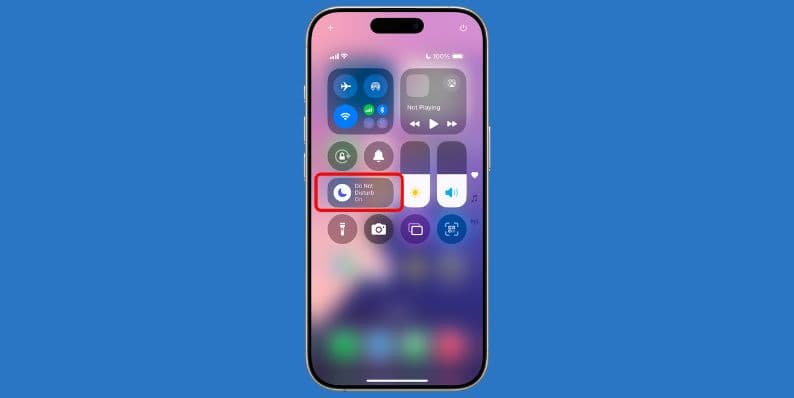
Control Center Method:
- Swipe down from the top-right corner of your screen if you have an iPhone X or a newer model.
- Swipe up from the bottom of your screen if you have an older model, like an iPhone 8.
- Tap the moon icon. This icon turns Do Not Disturb on or off.
Settings Method:
- Open the Settings app.
- Tap on Focus.
- Next, tap on Do Not Disturb.
- Slide the switch to turn it on or off.
- Tap on People or Apps to choose who or what can still get through to you.
Using Siri:
- You can just tell Siri what to do. Say something like, “Hey Siri, turn on Do Not Disturb.” Siri will then turn it on for you.
Set a Timer or Make a Schedule:
- In the Do Not Disturb menu, tap on Add Schedule.
- You can choose times for sleep, work, or other quiet hours.
- You can also pick locations. Or, you can choose it to turn on when you use certain apps.
- This is helpful because it turns on automatically. You do not need to think about it!
How to Turn Do Not Disturb On or Off on Android
Android phones, like Samsung, Pixel, and others, might look a little different from each other. But the main steps to use Do Not Disturb are mostly the same.
Quick Settings Menu:
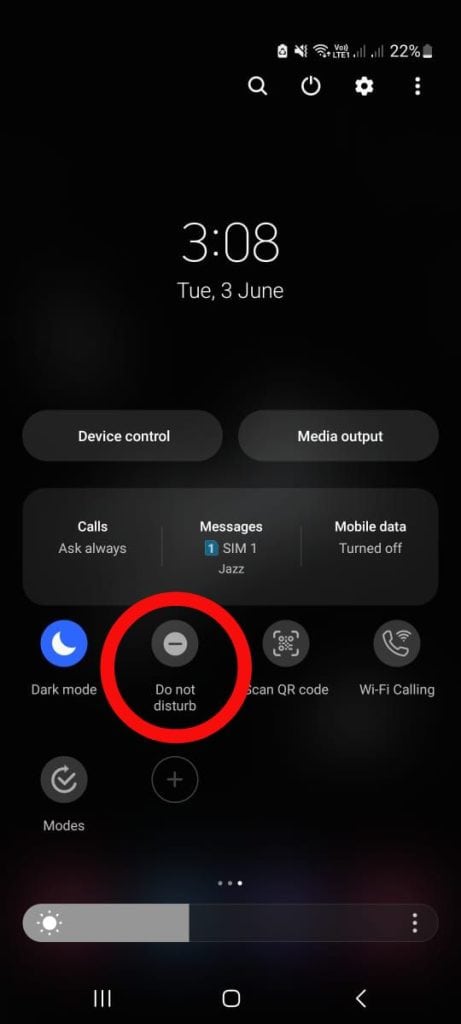

- Swipe down from the top of your screen. This opens the Quick Settings.
- Tap on the Do Not Disturb button. It might say DND.
- On some phones, this mode might have a different name, like Zen Mode or Bedtime Mode.
Settings Menu:
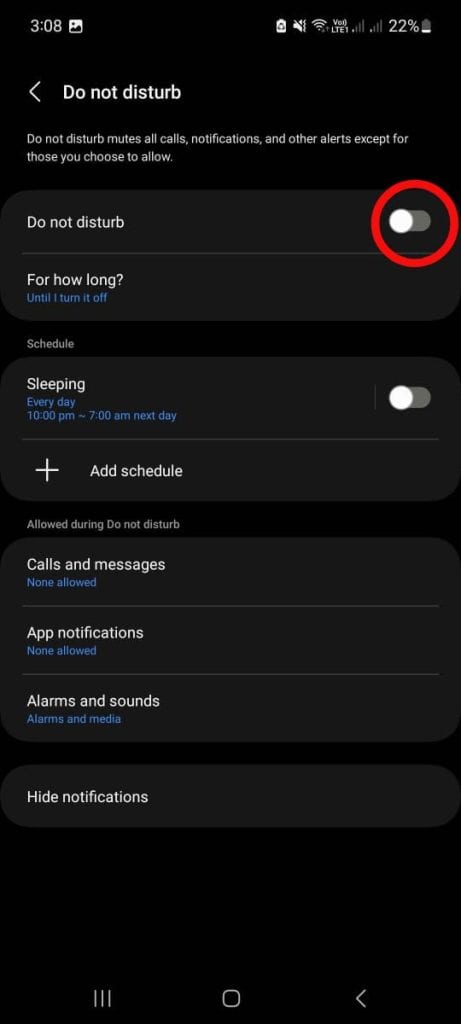
- Tap on Notifications or Sound and Vibration. (The name can change depending on your phone).
- Look for and tap on Do Not Disturb.
- Then, switch it on or off.
Phone Specific Paths:
- For Samsung phones: Go to Settings, then tap Sounds and Vibration, then find Do Not Disturb.
- For Google Pixel phones: Go to Settings, then tap Notifications, and then look for Do Not Disturb.
Voice Commands:
- You can use your voice with Google Assistant. Just say, “Hey Google, turn on Do Not Disturb.”
How to Make Do Not Disturb Work Better for You
You can change how Do Not Disturb works so it fits your day perfectly. Here are some cool options you can set:
- Choose special people (like family) whose calls can always come through.
- Allow repeat callers. This means if someone calls you twice in a few minutes, their call will ring.
- Make a schedule for sleep or work. DND will then turn on and off by itself at those times.
- On Android phones, use rules based on time or where you are.
- Connect DND to your calendar, so it turns on when you have meetings.
- Add a quick button (a shortcut or widget) to your phone’s home screen. This lets you turn DND on or off super fast.
These changes are easy to make. They help you control when your phone stays quiet.
Tips for Using DND the Smart Way
Here are a few more ideas:
- Set up a sleep schedule. Your phone will then get quiet every night at the same time.
- Use a Driving Mode or a DND setting for driving. This helps you focus on the road.
- Always allow calls from important family members. This way, you will not miss urgent news.
- Link DND with your calendar. It can then block alerts automatically during your meetings.
- If you have a smartwatch, connect its DND settings with your phone’s DND.
- Put a DND widget or shortcut on your home screen. Then, it is just one tap away!
Final Words
Do Not Disturb is a simple setting, but it can make a big difference in your day. It helps you focus better or rest when you really need to. Once you set it up the way you like, you will not have to think much about it again.
If this guide helped you, please feel free to share it with a friend! Do you have another cool tip about Do Not Disturb? Or maybe a question about your phone? You can leave a comment below and talk with others.