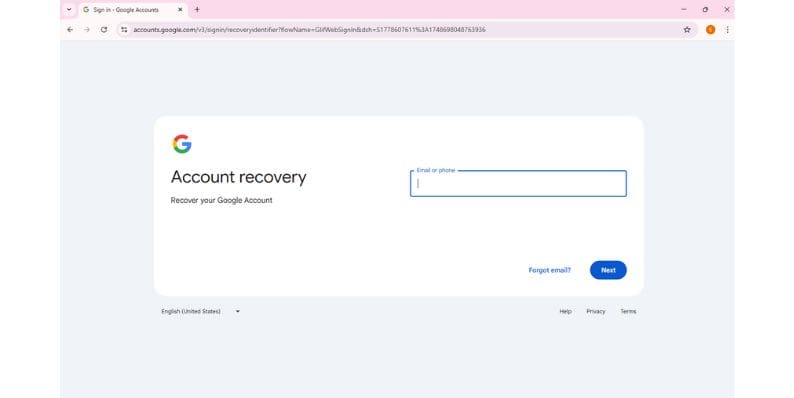
In today's digital age, personal online security is more important than ever. Email accounts, such as Gmail, are often the gateway to a person’s digital life—used for everything from banking to social networking. If someone suspects their Gmail account has been compromised, it's essential to act quickly and decisively. Changing the Gmail password is the first and most critical step to prevent further unauthorized access.
TL;DR
Suspect a Gmail security breach? Immediately change your Gmail password from your Google Account settings. Log out of all sessions, enable two-factor authentication, and review security settings. Take proactive steps to secure your account and ensure personal data remains private.
Identifying a Gmail Security Breach
Before changing your Gmail password, it's important to recognize the signs of a potential breach. Some common indicators include:
- Emails in your sent folder that you didn’t send
- Security alerts from Google about unfamiliar device logins
- Changes to recovery email or phone number
- Contacts reporting spam or phishing emails sent from your account
- Inability to log into your Gmail account
Even if you're not completely sure your account has been compromised, it's always better to err on the side of caution. Changing your password is a simple step that can secure your personal information from further harm.
Steps to Change Your Gmail Password After a Security Breach
Changing your Gmail password is a straightforward process. Here’s how anyone can do it in a matter of minutes:
1. Log In to Your Google Account
Go to https://myaccount.google.com and sign in with your current credentials. If you are unable to log in, click on “Forgot password?” and follow the prompts to recover access.
2. Navigate to Security Settings
Once logged in, click on the “Security” tab located on the left-hand navigation panel. Under the section labeled “Signing in to Google”, you will see an option labeled “Password”.

3. Change Your Password
Click on “Password”. You'll be prompted to enter your current password again. After verification, Google will ask you to enter a new password. Choose a strong, unique password that you haven’t used with this or other accounts before.
A strong password typically includes:
- At least 12 characters
- A mix of uppercase and lowercase letters
- Numbers and special characters
4. Log Out of Other Devices and Sessions
To kick any unauthorized users out of your account, scroll down in the Security tab and view “Your devices”. Click on “Manage all devices” and sign out of any devices you don’t recognize or no longer use.
Additional Security Measures
Changing your password is only one part of securing a compromised Gmail account. To ensure complete recovery and protection, consider the following measures:
Enable Two-Factor Authentication (2FA)
This feature adds an extra layer of protection by requiring a verification code sent to your phone or an authenticator app. Go to the “Security” tab, locate “2-Step Verification” and follow the setup instructions.
[h3>Review Your Recovery Information</h3]
Attackers may change recovery options to lock you out of your account. Double-check your recovery email and recovery phone number under the “Security” tab to make sure they are still accurate.
Check for Suspicious Activity
In the Gmail interface, scroll to the bottom right of your inbox and click on “Details” under “Last account activity”. This opens a window with details about recent logins, including IP addresses and access types.
Scan for Malicious Forwarding Rules
Hackers might set up automatic forwarding of your emails to monitor conversations silently. To review:
- Go to Gmail settings by clicking the gear icon, then select “See all settings”.
- Navigate to the “Forwarding and POP/IMAP” tab.
- Look for any unfamiliar forwarding addresses and remove them.
Revoke Access to Suspicious Apps
Sometimes third-party apps with Gmail access can be a point of vulnerability. Return to your Google Account, go to the “Security” section, and under “Third-party apps with account access”, remove anything that looks suspicious or isn't in use.
Run a Security Checkup
Google offers a built-in Security Checkup tool. This walkthrough helps you strengthen your account by checking recent activity, app access, and more.
Tips for Preventing Future Security Breaches
Once the account has been secured, taking preventative measures will help reduce the likelihood of future issues:
- Use a password manager: This ensures unique passwords across accounts and stores them securely.
- Be cautious with phishing emails: Never click on suspicious links or attachments.
- Use updated security software: Antivirus programs help detect malicious activity before damage is done.
- Regularly review account activity: Make it a habit to monitor login history and connected apps.
Conclusion
In the event of a Gmail security breach, swift action can prevent devastating consequences. Changing the password should be the first step, immediately followed by reviewing and updating the account’s security settings. With the right precautions, individuals can restore their digital safety and guard against similar threats in the future.
Frequently Asked Questions (FAQ)
1. What should I do if I can’t log into my Gmail account?
If you are locked out, go to the account recovery page and follow the steps to verify your identity and reset your password.
2. How often should I change my Gmail password?
It’s good practice to change passwords every 3 to 6 months, especially if you suspect any strange activity or have used the password elsewhere.
3. Can someone still access my Gmail if I just changed my password?
Yes, if they have access through approved third-party apps or if they've added mail forwarding rules. That’s why it’s crucial to review these settings post-breach.
4. What is the most secure way to create a new Gmail password?
Combine uppercase and lowercase letters, numbers, and special symbols. Avoid using personal information such as birthdays or pet names.
5. Is two-factor authentication really necessary?
Yes, 2FA significantly increases account security by requiring a second form of verification that hackers cannot easily obtain.
6. How can I know if any of my other Google services were affected?
Use Google’s Activity & Privacy Dashboard to review all activity across Google services associated with your account.
Maintaining strong digital security habits can save users from the stress and potential damage caused by account breaches. With Gmail being such an integral tool, knowing how to act quickly after a breach is a must for every user.